
📖 Step-by-Step Illustrated Manuals
Real sample screenshots and step walkthroughs for setup and daily operation.
 🔍 Click to Zoom
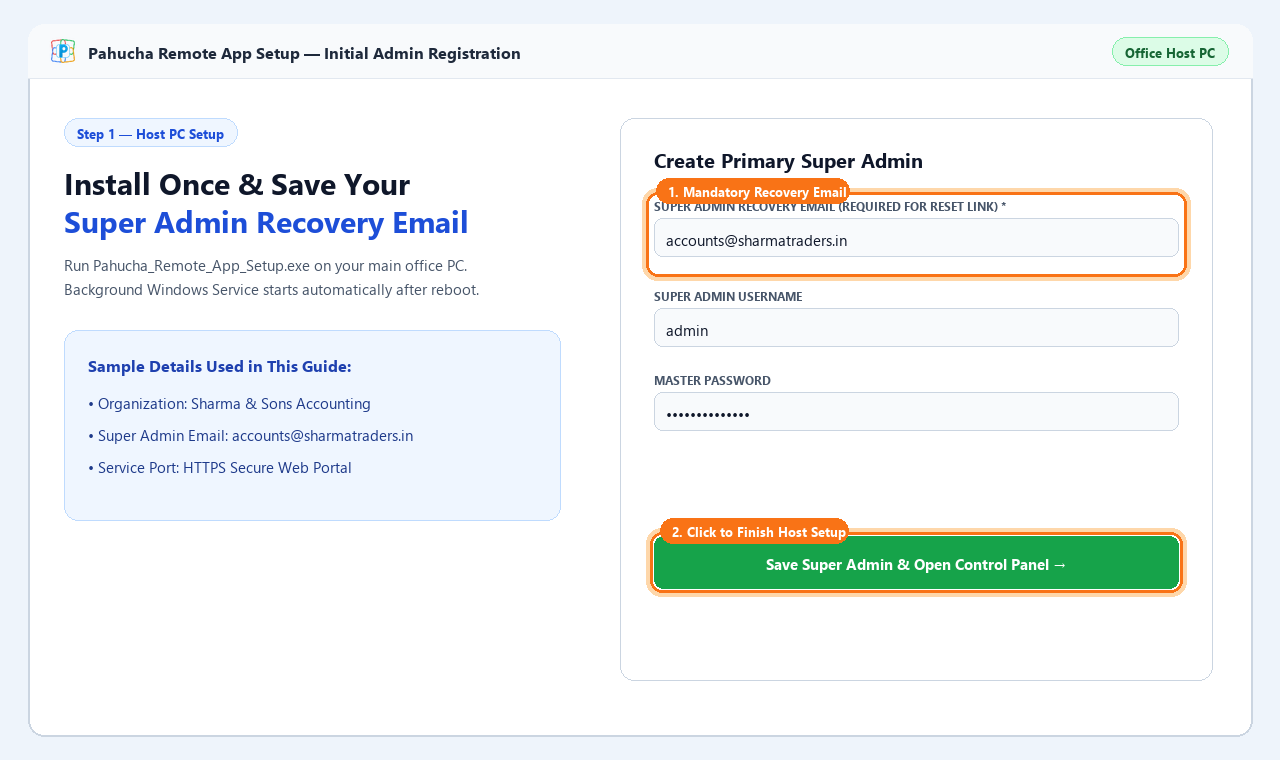
1. Server Installation & Super Admin Registration
Run the installer setup on your host Windows server to initialize database and admin credentials.
- Launch
Pahucha_Remote_App_Setup.exeas Administrator. - Choose installation directory and database location.
- Set initial Super Admin credentials & recovery email.
 🔍 Click to Zoom
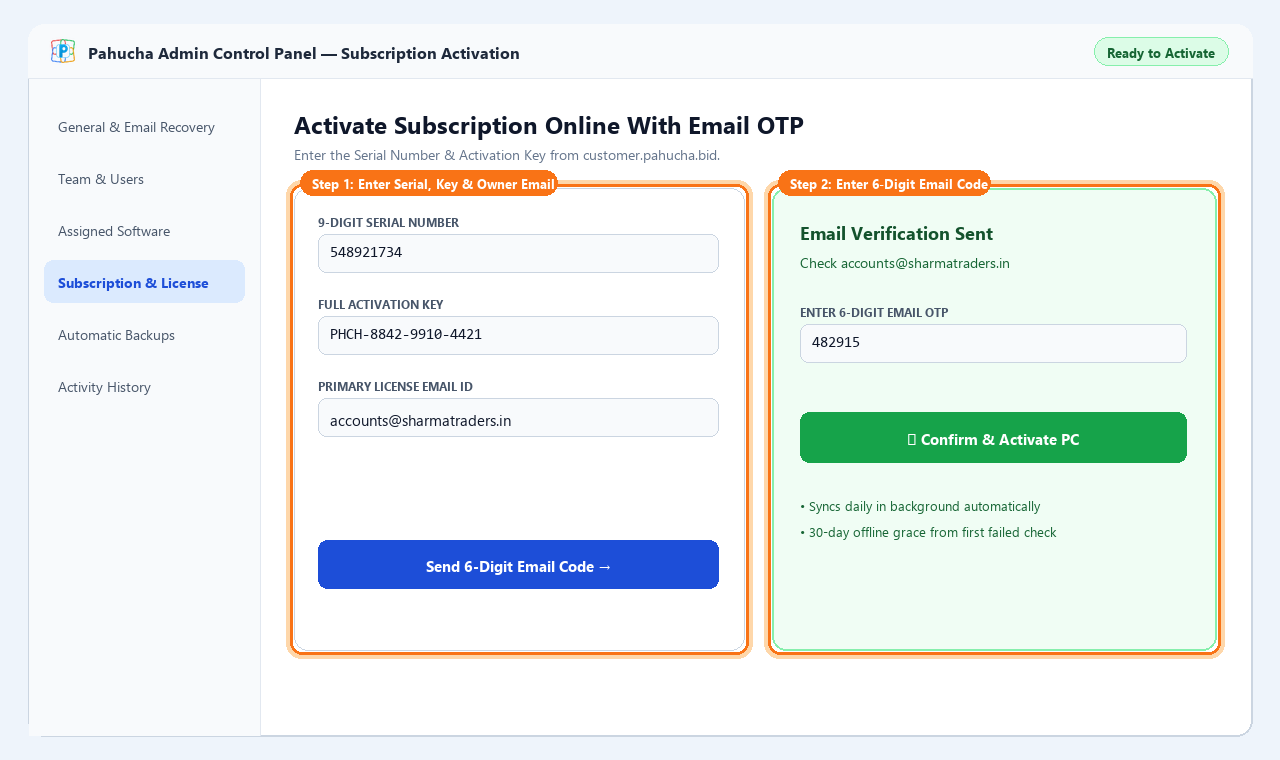
2. Admin Dashboard & License Activation
Activate your subscription online using registered email OTP or customer portal credentials.
- Open Admin Panel at
http://localhost:8080/admin. - Navigate to License & Activation tab.
- Enter Serial Number & verify with Email OTP.
 🔍 Click to Zoom
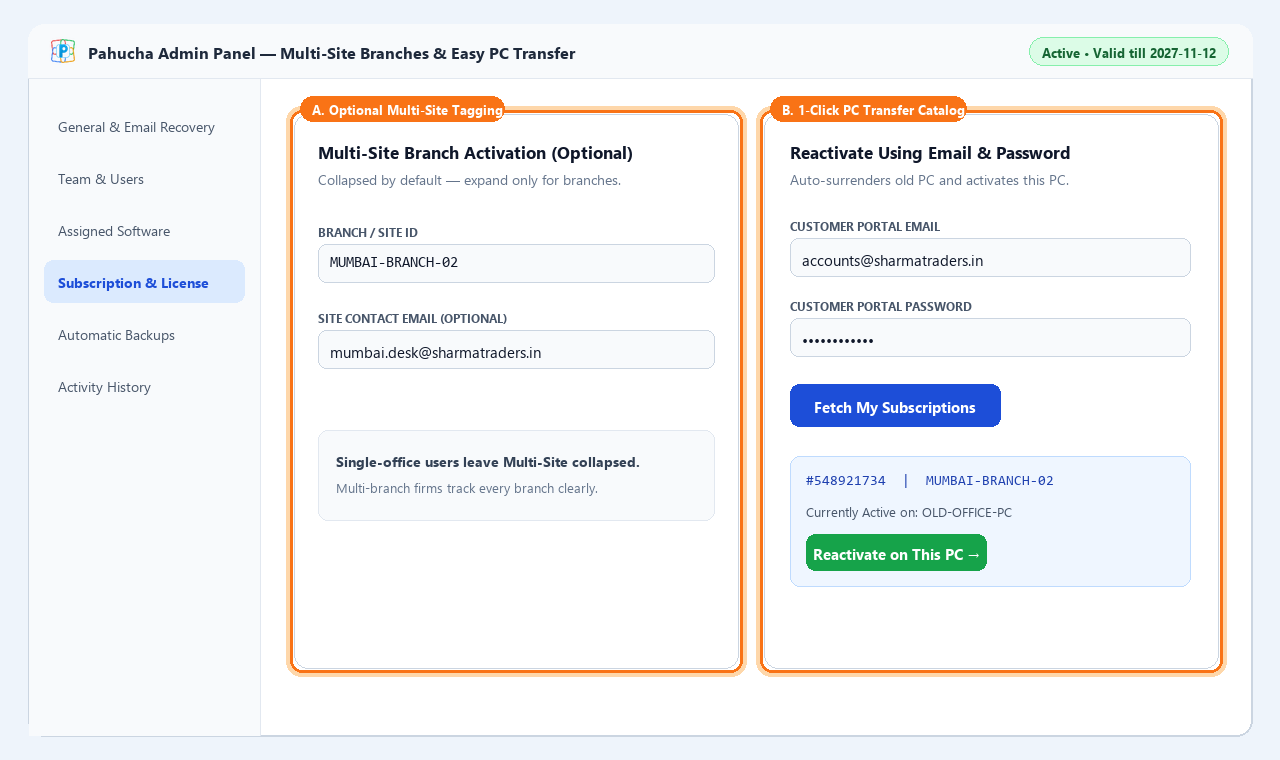
3. Branch Site Management & Hardware Transfer
Migrate server installations to new hardware using self-service hardware transfers.
- Open License tab and choose "Reactivate on this PC".
- Enter account email and password to fetch catalog.
- Confirm transfer without losing data or configurations.
 🔍 Click to Zoom
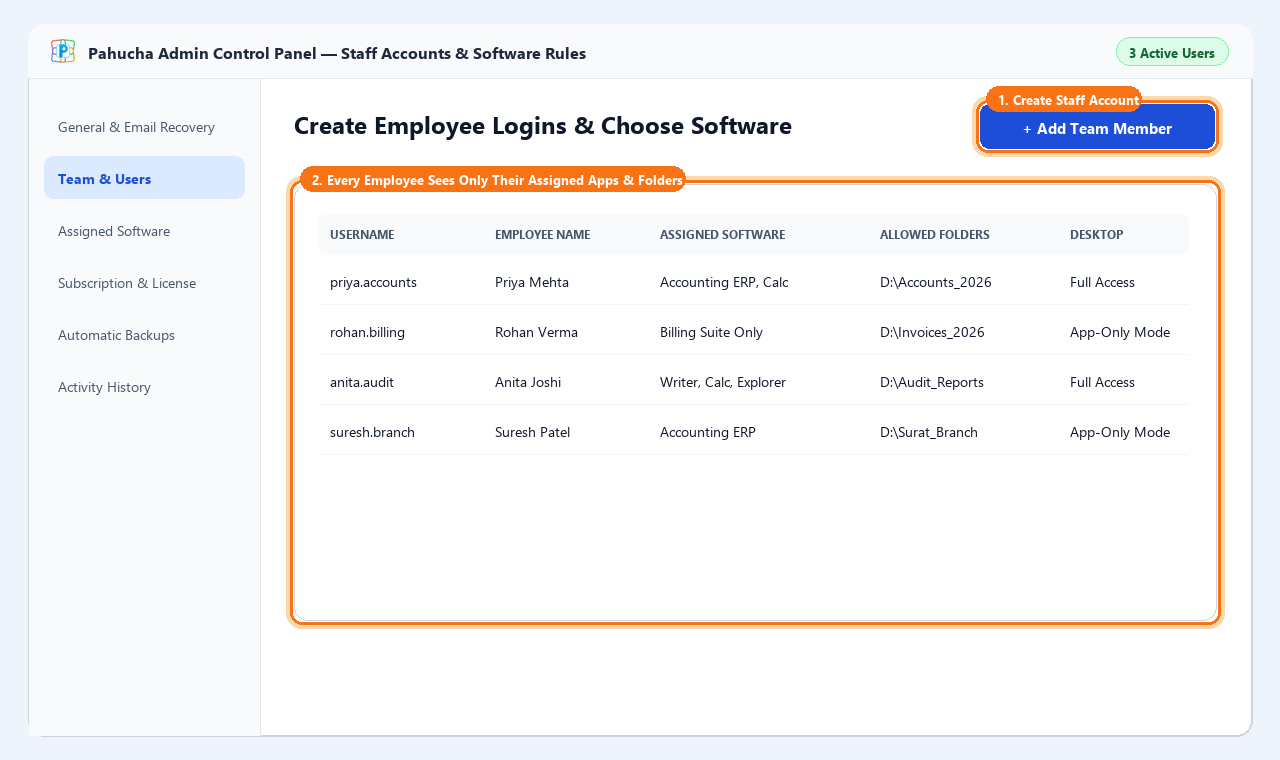
4. User Accounts & Application Assignment
Create remote team members and assign authorized Windows software and folders.
- Navigate to "User Management" tab in Admin Panel.
- Click "+ Add User" and select simplified or advanced mode.
- Toggle assigned applications, folders, and clipboard permissions.
 🔍 Click to Zoom
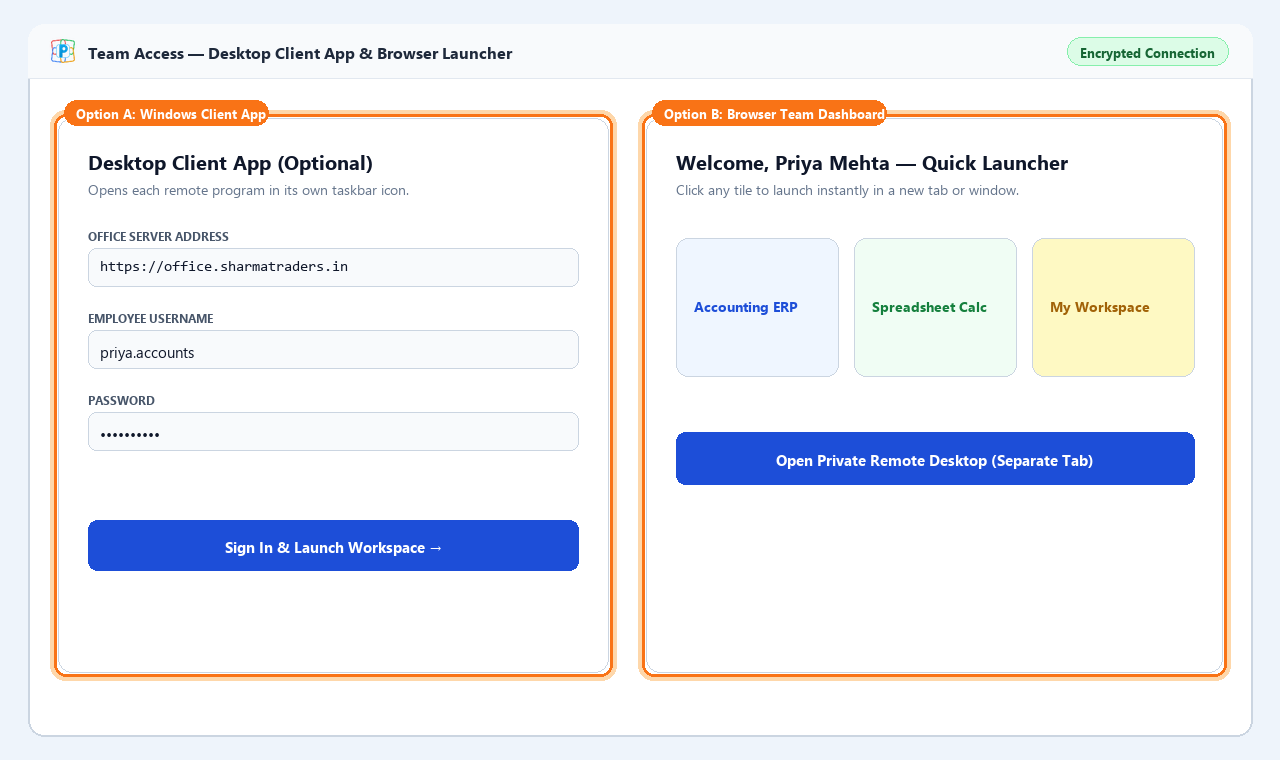
5. Remote Client Connection
Connect from user laptops using the standalone lightweight Remote Client Viewer.
- Launch
PahuchaRemoteClient.exeon employee computer. - Enter Server Address provided by Admin (e.g.
192.168.1.50:8080). - Enter User ID and Password to start streaming.
 🔍 Click to Zoom
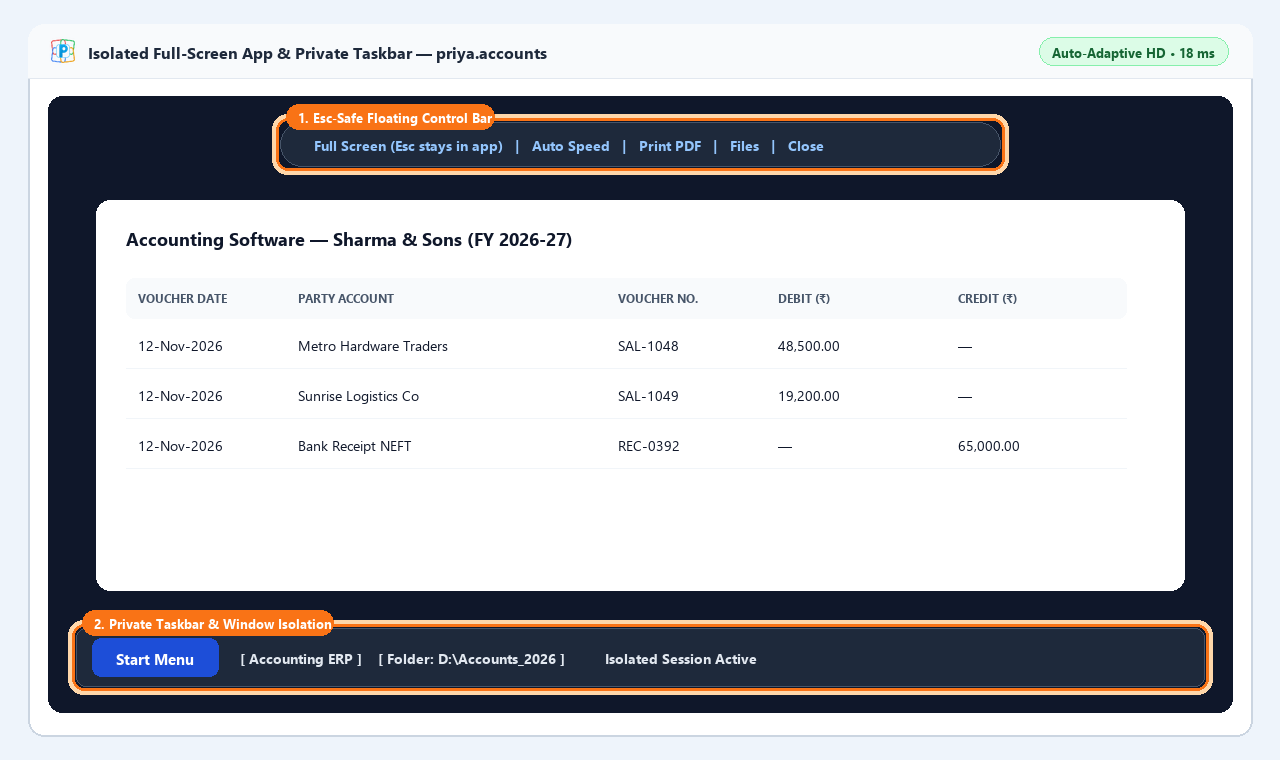
6. Isolated Multi-User Virtual Desktop
High-speed streaming session with 100% private window memory and taskbar policing.
- Work inside isolated virtual desktop environment.
- Native Windows shortcuts appear naturally on grid.
- Server Windows Explorer is blocked to protect server files.
 🔍 Click to Zoom
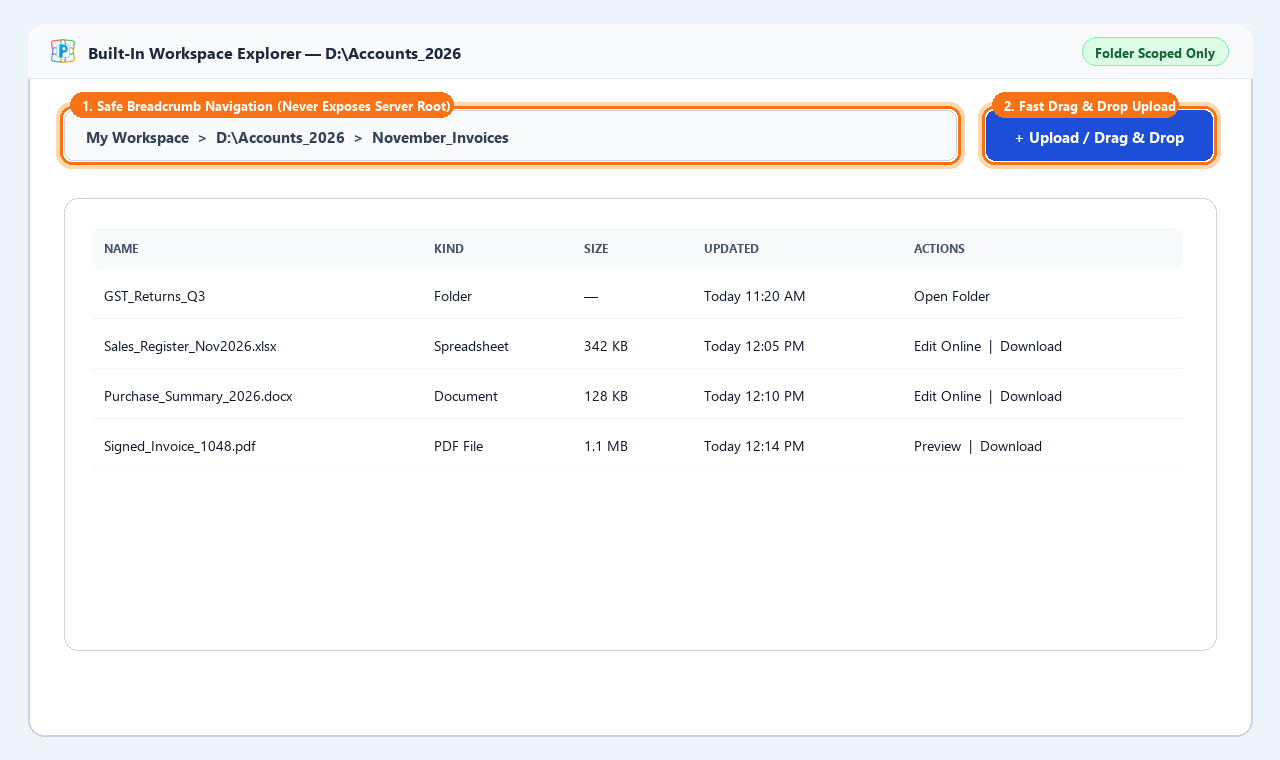
7. Private Workspaces & Drive Mapping
Every user receives a private sandbox folder with optional shared company drives.
- Click "My Files" in floating panel or desktop icon.
- Upload and download files securely between laptop and server.
- Other users cannot see or touch your personal documents.
 🔍 Click to Zoom
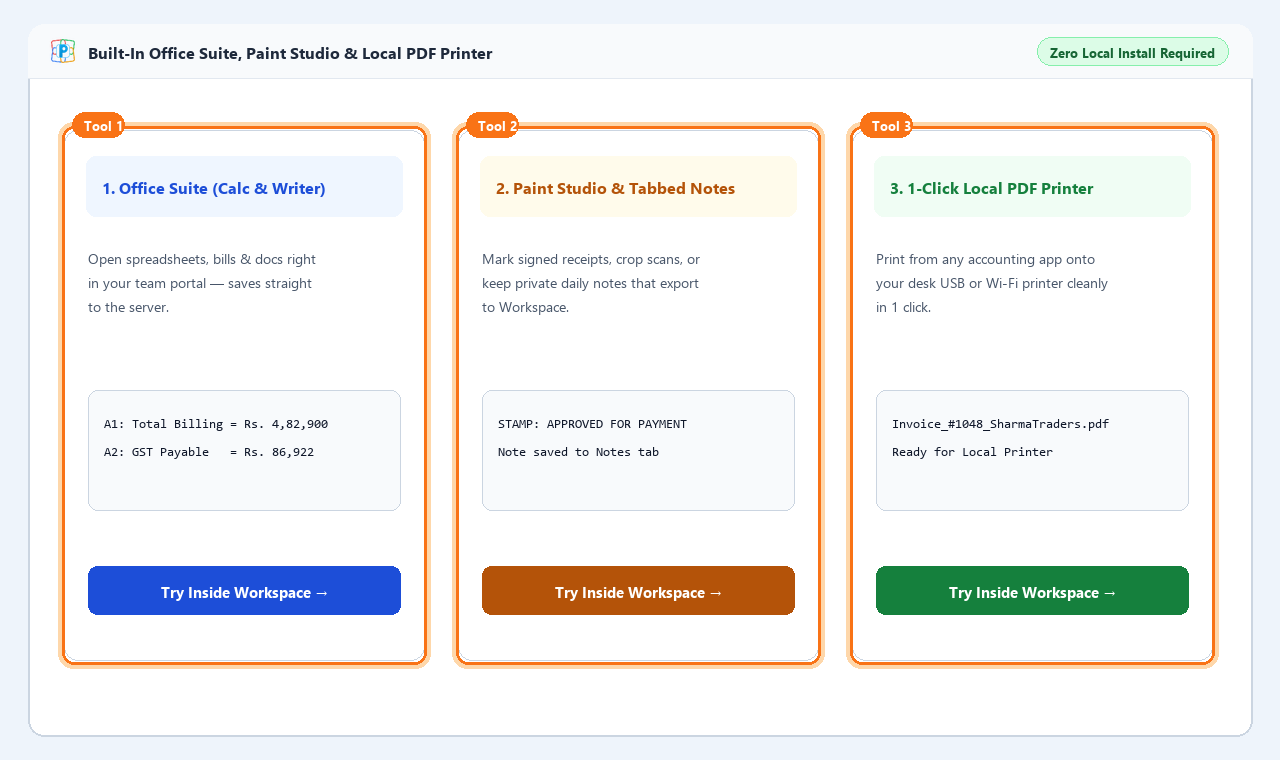
8. Built-in Office Suite & Seamless Printing
Spreadsheet editor, Document writer, PDF tools, and universal remote print redirection.
- Open Calc Spreadsheets, Writer, or Paint Studio in 1 click.
- Print invoices or reports directly to your local printer.
- Prints queue automatically without installing complex drivers.
🔍 Error Code & Troubleshooting Directory
Look up standard error codes to see plain-language meanings and instant self-service fixes.
AUTH-101
🟢 Self-Service Fix
Incorrect Password or Invalid Credentials
▼
AUTH-102
🟢 Self-Service Fix
Username or Account ID Already Exists
▼
NET-201
🟢 Self-Service Fix
Host Server Unreachable or Connection Refused
▼
VER-301
🟢 Self-Service Fix
Client-Server Version Incompatibility Handshake
▼
LIC-401
🟢 Self-Service Fix
Subscription Expired for this Software Release
▼
SYS-501
⚠️ Technical Support
Database Storage Permission or Disk Write Barrier
▼
UPD-601
⚠️ Technical Support
Update Checksum Integrity Mismatch
▼
📦 Previous Versions & Release Archive
Download older verified releases for Host Server, Remote Client, and Office tools.
| Version | Release Date | Component | Package Size | Compatibility / Notes | Download |
|---|---|---|---|---|---|
| v2.1.0 Latest Stable | 15 Nov 2026 | Host Server (Lite) | 52 MB | Windows 10 / 11 / Server 2019+ | ⬇️ Download Setup |
| v2.1.0 Latest Stable | 15 Nov 2026 | Host Server (With Office) | 250 MB | Bundled spreadsheet, docs, PDF tools | ⬇️ Download All-in-One |
| v2.1.0 Latest Stable | 15 Nov 2026 | Remote Client Viewer | 18 MB | Standalone viewer for user laptops | ⬇️ Client App |
| v2.0.0 LTS Release | 01 Nov 2026 | Host Server (Lite) | 51 MB | Matches v2.0.0 database schema | ⬇️ Download v2.0 |
| v2.0.0 LTS Release | 01 Nov 2026 | Remote Client Viewer | 17 MB | For users connecting to v2.0 servers | ⬇️ Client v2.0 |
| v1.9.0 | 20 Oct 2026 | Host Server (Legacy) | 50 MB | Legacy compatibility edition | ⬇️ Download v1.9 |
❓ Frequently Asked Questions (FAQs)
Clear answers to common questions about multi-user sessions, printing, and licenses.
What services does Pahucha Remote App provide, and who is responsible for operating system or third-party software licenses? ▼
Service Scope: Pahucha Remote App provides remote application display streaming, workspace session management, and browser-based access services for host computers.
Third-Party & OS Licensing Disclaimer: Whether any underlying operating system licenses, client access licenses (CALs), multi-user permits, or third-party software entitlements are required for the host operating system or any application running on the host machine must be independently verified, acquired, and maintained by the customer directly with their respective software vendors at their own level. Pahucha Systems holds no role, responsibility, compliance obligation, or liability whatsoever regarding third-party software or operating system licensing compliance on customer-managed infrastructure.
Third-Party & OS Licensing Disclaimer: Whether any underlying operating system licenses, client access licenses (CALs), multi-user permits, or third-party software entitlements are required for the host operating system or any application running on the host machine must be independently verified, acquired, and maintained by the customer directly with their respective software vendors at their own level. Pahucha Systems holds no role, responsibility, compliance obligation, or liability whatsoever regarding third-party software or operating system licensing compliance on customer-managed infrastructure.
Can remote employees see each other's desktop files or private notes? ▼
Never. Every connected user receives a strictly partitioned user workspace directory. Standard Windows Explorer is locked to prevent browsing server drives. User A cannot access User B's files.
How do I restore an older backup into a new release? ▼
If a backup belongs to an earlier schema, the application will alert you with
VER-301 and offer an automated Migration Assistant to upgrade historical data safely into the new release format without data loss.
Can I print invoices directly from the remote desktop to my local printer? ▼
Yes. When you print any document or invoice inside your session, the print stream is automatically intercepted, converted to a high-fidelity vector PDF, and delivered to your local computer's default printer in seconds.
What happens if my server hardware breaks down? ▼
Your subscription includes up to 5 self-service hardware migrations per calendar year. Simply install the software on your new server and select "Reactivate on this PC" using your registered email OTP.
🛟 Official Support & Technical Help Desk
Reach official assistance for enterprise deployments, licensing questions, or technical diagnostics.
WhatsApp Quick Support
Chat directly with official support engineers for fast assistance with licenses and setup.
💬 +91 9140964176
Email Technical Desk
Send diagnostic logs, error codes, and server questions for detailed engineer investigation.
📧 mishratechsolutions@gmail.com
Direct Helpline
Phone assistance available Monday to Saturday (9:00 AM – 8:00 PM IST) for critical server issues.
📞 +91 9140964176